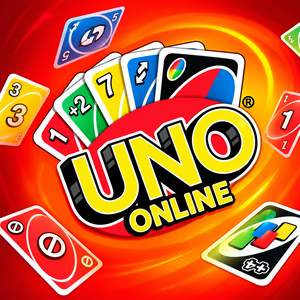
Uno Online
 Bunny Farm
 Longcat
 Mahjong Connect
 Helix Jump
 Bad Ice-Cream
 Stealing the Diamond
 Blocky Blast Puzzle
 Block Breaker
 Brick Breaker
 Block Blast Puzzle
 Color Block Jam
 Block Blaster
 Tetris
 Hexa Stack
 Big Block Blast
 Paper Block
 BlockBuster Puzzle
 Blocky Rush
 Xmas Block Blast
 Blox Puzzle
 Blox Slider
 Idle Breakout
 Hexa Puzzle
 Wood Block Journey
 Neon Block Blast
 2048
 Sandtris
 Cubes 2048
 Tomb of the Mask
 Candy Crush
 Bloxorz
 block Jam
 Bubble Shooter
 Tic Tac Toe
 Tetra Twist
 Water Sort Puzzle
 Bricky Blast
 Solitaire
 Suika Game
 Parking Rush
 Free The Key
 Level Devil
 Apple Worm
 Her Trees
 Happy Glass
 Block Quest
 Bus Stop Jam
 Block Blast Jewel Puzzle
 Spider Solitaire
UNO Online - Play the Classic Card Game with Friends
UNO Online is the digital version of the popular UNO card game, where players compete by matching cards based on their colors, numbers, or symbols. The goal is simple: be the first to get rid of every card in your hand. However, reaching that goal requires planning each move, choosing the right moment to play action cards, and keeping an eye on how many cards your opponents have left.
Based on the familiar UNO rules, this game delivers an accessible and entertaining experience right in your browser. There's no need to prepare a physical deck or install separate software. With just a few simple clicks, players can jump into a match and enjoy unexpected competitive moments.
UNO Online builds on the original UNO card game, created by Merle Robbins in 1971 in the United States. The game was initially developed as a family-friendly activity with simple color- and number-matching rules that made it easy for everyone to join in. Over time, UNO became a familiar card game around the world. The online version brings this classic experience to digital platforms, allowing players to enjoy its traditional rules on computers and mobile devices.
Figure 1. Get ready for a colorful card battle in UNO Online!
How to Play UNO Online
UNO Online uses a turn-based card-playing system. Players must choose cards that match the one at the top of the discard pile while using special cards to disrupt their opponents' plans.
Start the Game and Deal Cards
At the beginning of an UNO Online match, each player receives 7 cards. The remaining cards are placed face down to form the draw pile. Then, one card is flipped over and placed in the center of the table to determine the starting conditions for the first turn.
Players take turns in order. During each turn, they must choose a valid card to place on the discard pile. If they don't have a suitable card, they must draw another one from the shared pile according to the game's rules.
Match Cards by Color, Number, or Symbol
The core mechanic of UNO Online revolves around matching cards based on three elements: color, number, and symbol. A valid card generally needs to match at least one of these features on the top card of the discard pile.
- Match by Color: Play a card that has the same color as the currently displayed card. The game uses four basic colors: red, blue, green, and yellow.
- Match by Number: Choose a card with the same number as the previous card, even if the colors are different.
- Match by Symbol: Play a card with a matching action symbol, such as Skip or Reverse, according to the game rules.
When players don't have a suitable card, they must draw another one. This makes hand management important, as each additional draw can slow down their progress toward victory.
Call UNO Before Playing Your Last Card
UNO is an important rule to remember when a player has only one card left in their hand. After playing their second-to-last card and keeping just one, they must press the UNO button to announce their remaining card.
If a player forgets to call UNO and an opponent catches the mistake before the next turn begins, they must draw two additional cards as a penalty under the standard rules. This can wipe out an advantage because of one small mistake.
Keeping track of the number of cards in each hand isn't just about watching opponents. It also helps players avoid unnecessary penalties. During the final stages of a match, calling UNO at the right moment is essential.
Simple Controls of UNO Online for Desktop and Mobile
UNO Online features an intuitive control system that lets players focus on choosing cards without having to memorize complicated commands.
On a computer, players use the mouse to select the card they want to play, click the draw pile when they need another card, and press the UNO button when only one card remains. When playing a Wild or Wild Draw Four, they select the next color to continue the match.
On phones and tablets, the same actions are performed by tapping cards or functional buttons directly on the screen. The touch-friendly interface makes selecting cards convenient across devices with different screen sizes.
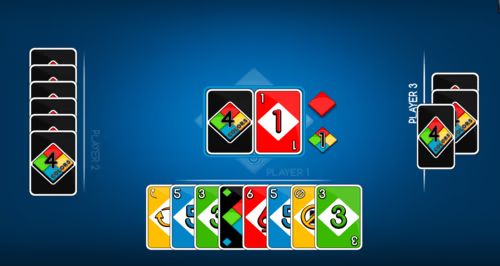
Figure 2. Manage your hand, save Wild cards for the perfect moment
Discover the Different Types of UNO Cards
A standard UNO deck contains 108 cards divided into three main groups: Number Cards, Action Cards, and Wild Cards. Each group serves a different purpose, from maintaining regular turns to completely changing the course of a match.
Number Cards
Number Cards are the basic cards in the deck. They come in four colors: red, blue, green, and yellow, and feature numbers from 0 to 9. These cards appear frequently throughout the game and form the foundation of the matching system. Each color has one 0 card and two cards for every number from 1 to 9. Players can play a Number Card when it matches the color or number of the card at the top of the discard pile.
Although they don't have special effects, these cards play a major role in maintaining the flow of each turn. Organizing and playing Number Cards strategically helps players reduce the number of cards in their hands while saving action cards for important moments.
Action Cards
Action Cards directly change the turn order and affect which players get to make their moves. This group includes three main types:
- Skip: Skips the next player's turn, preventing them from making an immediate move.
- Reverse: Reverses the direction of play. This card changes the turn order and can create an advantage in the right situation.
- Draw Two (+2): Forces the next player to draw two additional cards and lose their turn.
Wild Cards
Wild Cards can change the color currently in play. This gives players more options when they want to switch to a color that better matches the cards remaining in their hands. There are two main types of Wild Cards:
- Wild: Allows players to choose one of the four colors: red, blue, green, or yellow - to continue the turn.
- Wild Draw Four (+4): Allows players to change the color while forcing the next player to draw four cards and lose their turn.
Choose Your UNO Online Game Mode
UNO Online offers different ways to play based on the number of participants. Each mode creates its own competitive experience, from direct one-on-one battles to matches involving multiple players.
2-Player Mode
The two-player mode creates a direct showdown between two opponents. Every card played can immediately affect the other player, making turn control an important part of the strategy.
Players need to pay attention to the colors their opponents frequently use, how many cards they have left, and whether they're close to winning. Skip, Reverse, and Draw Two cards can be used to interrupt their turns or force them to pick up additional cards.
3-Player Mode
The three-player mode adds another opponent, making it harder to predict upcoming moves. Players can no longer focus on just one rival; they must keep track of the cards and progress of both opponents.
Action Cards become especially important because they can influence the turn order. A well-timed Reverse or Skip can change who gets to play next, creating more opportunities to control the match.
4-Player Mode
The four-player mode brings more competition, additional turns, and less predictable situations. With more opponents at the table, players need to watch different strategies, especially when someone suddenly has only one card remaining.
Draw Two, Skip, and Wild Draw Four cards can become valuable tools for stopping opponents from getting closer to victory. However, action cards should be played based on the current situation rather than used as soon as an opportunity appears.
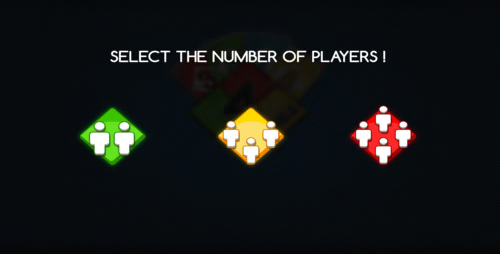
Figure 3. UNO Online matches with up to four players
What Makes UNO Online Fun to Play?
UNO Online maintains the appeal of the traditional card game by combining easy-to-understand rules with constantly changing competitive situations. New players can quickly learn how to match cards, while experienced players still need to think carefully before making each move.
The action card system is one of the features that makes the game stand out. Skip can prevent an opponent from taking their next turn, Reverse changes the direction of play, while Draw Two and Wild Draw Four force other players to pick up additional cards. These effects keep the advantage from staying with one player for too long and create plenty of opportunities to turn the match around.
UNO Online also combines the luck of drawing cards with strategic decision-making. Players need to know when to save a Wild card, when to use an action card, and how to choose a color that works best with their current hand.
The ability to play directly in a browser also makes the game convenient. Without preparing a physical deck or installing separate software, players can enjoy entertaining matches on computers and mobile devices. The available modes for two to four players provide more ways to enjoy the game with different group sizes.
Play UNO Online
UNO Online brings the classic card game closer to players through a simple and accessible online experience. From matching cards by color and number to using action cards that can change the turn order, every match requires careful observation and smart decisions.
Whether facing one opponent in a two-player showdown or competing at a four-player table, the goal remains the same: get rid of all your cards before anyone else and make the most of every opportunity. Visit blockblast3d.com to play UNO Online, explore the different card types, and put your decision-making skills to the test with every turn.