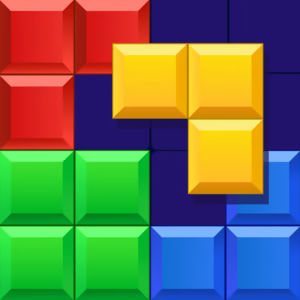
Block Blaster
 Bunny Farm
 Longcat
 Mahjong Connect
 Helix Jump
 Bad Ice-Cream
 Stealing the Diamond
 Blocky Blast Puzzle
 Block Breaker
 Brick Breaker
 Block Blast Puzzle
 Color Block Jam
 Tetris
 Hexa Stack
 Big Block Blast
 Paper Block
 BlockBuster Puzzle
 Blocky Rush
 Xmas Block Blast
 Blox Puzzle
 Blox Slider
 Hexa Puzzle
 Idle Breakout
 Wood Block Journey
 Neon Block Blast
 Sandtris
 2048
 Cubes 2048
 Tomb of the Mask
 Candy Crush
 Bloxorz
 block Jam
 Tetra Twist
 Bubble Shooter
 Tic Tac Toe
 Water Sort Puzzle
 Bricky Blast
 Solitaire
 Suika Game
 Parking Rush
 Free The Key
 Level Devil
 Apple Worm
 Her Trees
 Uno Online
 Happy Glass
 Block Quest
 Bus Stop Jam
 Block Blast Jewel Puzzle
 Spider Solitaire
Block Blaster - A Block Puzzle Game That Challenges Your Strategy
Block Blaster is a block puzzle game where players must study the grid, choose the right positions, and arrange blocks strategically. The game focuses on spatial awareness, planning each move ahead, and managing the available space.
Getting to Know the Genre and Main Objective
Block puzzle games use geometric shapes as the core of their gameplay. Instead of controlling a character and dodging obstacles, players solve placement puzzles within a limited space. Block Blaster follows this approach, asking players to make decisions based on each block's shape and the current state of the board.
The main goal is to place blocks in suitable positions, use space efficiently, and keep the board manageable for upcoming moves. Players need to look at the entire grid rather than simply find a spot for the current block. This approach turns every placement into a strategic decision.
Arranging Blocks on the Grid
The game board is divided into square cells, creating specific spaces for blocks to fit into. Each block occupies a certain number of cells depending on its shape. Before placing a block, players must check whether the entire shape fits within the available space.
Since the board has limited space, careless placement can make later moves more difficult. On the other hand, thoughtful arrangements preserve more options and prevent empty spaces from becoming fragmented. This is a key part of the strategy in Block Blaster.
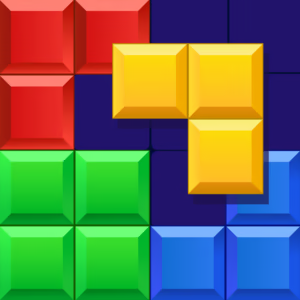
Figure 1. Jump into Block Blaster, place blocks with care
Block Blaster Gameplay
Getting Started with the Grid
At the start of the game, players need to understand the board's structure and how the empty cells are distributed. Identifying areas with enough room for a block is the first step before making a move.
Blocks come in different shapes, so not every empty space can accommodate every piece. A large open area with an irregular layout may still be unsuitable for a particular shape. Looking at the entire board also helps players identify spaces worth saving for later moves. Instead of focusing only on the nearest available spot, consider how placing a block will change the overall layout.
Placing Blocks and Managing Space
Choosing the right position is essential to making each move count. A well-placed block can make good use of the available space while preserving options for upcoming pieces. In contrast, a poorly placed block can split the board into smaller sections and limit future placements.
Before making a move, check the available positions, consider the block's shape, and think about how the placement will affect the rest of the board. Keeping useful open spaces is just as important as filling the cells already available.
How to Play Block Blaster and Its Controls
Block Blaster uses intuitive controls, making it easy for players to get familiar with its block-placement mechanics.
- On PC: Use the mouse to select a block, drag it to the desired position, and release it to place it on the board.
- On phones or tablets: Touch a block, drag it to a suitable area on the touchscreen, and release your finger.
Block Blaster's Visual Design
Block Blaster's interface centers on the grid and geometric blocks. This layout puts the play area front and center, helping players track occupied cells and the spaces that remain open. Elements directly related to block placement are clearly arranged around the board, supporting observation and decision-making.
The visuals emphasize the distinction between blocks and cells. Grid lines make the board easy to read, while each block's shape shows how much space it occupies. The contrast between filled areas and empty spaces is important because players need to quickly identify potential placement options.
The geometric style also fits the game's core concept. Rather than relying on a complex setting or character animations, the design prioritizes information that matters to the gameplay. This keeps the focus on block shapes, positions, and arrangements. The clear interface also makes drag-and-drop controls easy to follow across devices with different input methods.
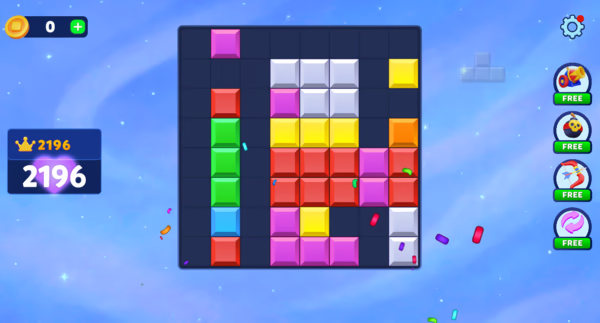
Figure 2. Make smarter placements
What Makes Every Move in Block Blaster Challenging?
Less Space to Work With
As blocks fill the board, the number of empty cells decreases and the layout changes. The remaining spaces may no longer fit the next pieces. Players need to balance making use of the current space with preserving valuable positions for future moves.
Tricky Block Shapes
Not every block is easy to place. Long pieces or shapes with unusual layouts need matching open spaces, making them harder to fit once the board has been divided into smaller sections. Recognizing each shape early and avoiding the loss of important areas can help players stay in control.
Knowing When to Change Your Plan
A strategy that works at the beginning may no longer be effective as the board changes. Players must continually reassess the grid, adjust their priorities, and find workable placements based on the space that remains. This ability to adapt adds depth to Block Blaster.
Block Blaster Leaderboard - Compete for a Higher Rank
The Leaderboard adds a competitive element to the Block Blaster puzzle experience. Through the rankings, players can track their performance and compare their results with those of other players.
The Leaderboard creates an additional goal beyond arranging blocks and managing space. Players need to use the grid efficiently, think carefully about each move, and aim for better results. Combining strategic thinking with competition gives each session another purpose, especially for players who want to keep improving their personal performance.
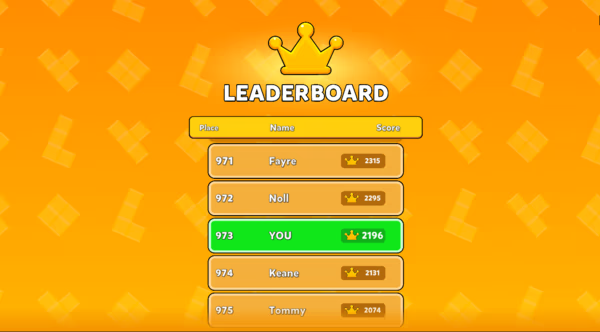
Figure 3. Manage the grid carefully
Play Block Blaster Online
Block Blaster can be played directly in a browser through the game page available on blockblast3d.com. Players simply need to visit the page, wait for the game to load, and start placing blocks on the grid. This makes the game easy to access without installing a separate app, using the browser-based format of the version featured on the site.
The game supports mouse controls on computers and touchscreen controls on mobile devices. No matter which device you use, the key is to study the board, choose suitable positions, and manage the remaining space after each placement.
With intuitive block-placement mechanics that still require careful planning, Block Blaster delivers a puzzle experience focused on strategy. Paying attention to the board, preserving useful empty spaces, and adapting your plan are all important for arranging blocks more effectively with every move.